

For a decade, Frommer’s has done a regular deep-dive test of the big hotel booking websites, and somehow we always imagine results won’t change that much.
This time, we were surprised. The surprise was in how many familiar names that fell off the list. Tripadvisor? No longer on the list. Kayak? Momondo? Not in the top ten anymore.
It isn’t that they’re gone. They’ve just been subsumed. Industry consolidation has moved many major hotel booking sites under the same corporate umbrellas. For example, the Expedia Group now owns CarRentals.com, CheapTickets, Ebookers, Expedia, Hotels.com, Hotwire, Orbitz, Travelocity, Trivago, Vrbo, and Wotif, so the results don't differ much.
For a while, hotel booking sites behaved differently even if they were corporate siblings. Now the streamlining has sped up. Today, Hotels.com mirrors Expedia. Momondo and Kayak became shells for HotelsCombined data.
Intriguingly, however, our #1 site this time doesn’t belong to any of the old travel conglomerates.

The three types of hotel search engines
There are three principal types of websites you can use to find hotels: the hotels’ own websites, which may offer special deals to book direct; OTAs (online travel agencies); and aggregators, or meta-search engines, which don’t actually handle reservations, but trawl both OTAs and hotel sites to return a compendium list of results. Once they find your price quotes, aggregators pass you off to OTAs or hotel sites to make your final reservation. We tested both OTAs and aggregators.
Why include OTAs at all when there are aggregators that search them? Because sometimes the OTAs (Agoda in particular) will offer a lower rate than the aggregators. And sometimes aggregators will find you a rate from an OTA that’s lower than even what you’d find if you searched that OTA directly.
Always check the top OTAs first (to score any direct discounts), then run your itinerary through the top aggregators and see if they can beat the OTAs at their own game.
Tips for finding deals at hotel booking sites
Research third-party sites. Aggregators sometimes display amazingly low prices from booking services that have sketchy track records for customer service. If you see a great rate from a company you’ve never heard of, do a quick search for reviews or scams associated with that business name and check its reputation at the Better Business Bureau (bbb.org). Rest assured: In our survey, we ignored results from sketchy sites and we only counted rates from resellers we know to be reputable.
Don't trust “user” reviews. Fake reviews have always been a problem, but the AI era has helped the worst offenders gin up authentic-seeming but fake five-star "reviews" to lard the message boards of Reddit, Tripadvisor, and other public squares where folks discuss these things.
Beware of fees. Not just the fiendish “resort fees” charged by some hotels. One-time "cleaning fees" or “property fees ” at rentals can stack up alarmingly, sometimes doubling or even tripling the initial sticker price. Some sites offer the option to fold these costs into the results (albeit often in a smaller font), while others make you wait until the final booking page before they reveal the soaking.
Become a member. You can sign into some OTAs and net 4% to 6% in savings. Member savings at aggregator websites are less common, and only on the order of 1% to 2%. We used the plain, “non-member” rates for all our tests.
Skip the artificial intelligence. Several sites have rolled out AI “smart filters” that proved not to be ready for prime time. We picked Las Vegas as a test case and asked each AI helper two questions that required minimal parsing, were not covered by standard filters, and had definite answers: "Hotels not on the Strip" and "Hotels without a casino." The most common result for AI was abject failure—although one site actually managed both of them fairly well. We’ll detail its efforts in the reviews.
Pretend you’re Irish. Finally, a tip for travelers with some technical savvy: To ensure you always get the actual total prices including all taxes and fees, consider using a virtual private network, or VPN, to do your hotel shopping through a server based in Ireland, where EU regulations require all those charges to be announced up front. Any server in continental Europe will do, but choosing Ireland has the benefit of automatically showing results in English. Sites let you switch which currency you see so you don’t have to convert euros in your head. If you do this, clear your browser’s cookies first so the hotel websites won’t remember any previous visits.

How we determined our ranking
We threw 56 room reservation scenarios at the major sites to determine which could find the cheapest rates and the most options.
To start, we tallied the number of choices each contender could rustle up in four price categories in six major cities: San Francisco, Philadelphia, Rome, Paris, Hong Kong, and Buenos Aires.
Then we searched for the lowest rates each site could find for four or five specific downtown hotels at various price points in each city for a mid-week, shoulder-season stay three months in advance. This assured us the most honest base prices, avoiding high-season or holiday spikes and taking anomalous last-minute discounts out of the running.
When we compared performances, we awarded points to sites that found the lowest rates on a given hotel—and subtracted points for returning higher prices than other websites. Using a weighted points system, we looked at the number of properties each site could find and rewarded sites that consistently offer you the most options and save you the most money.
So who made our top 10 this year? Here we go.
#10: Hotwire
OTA
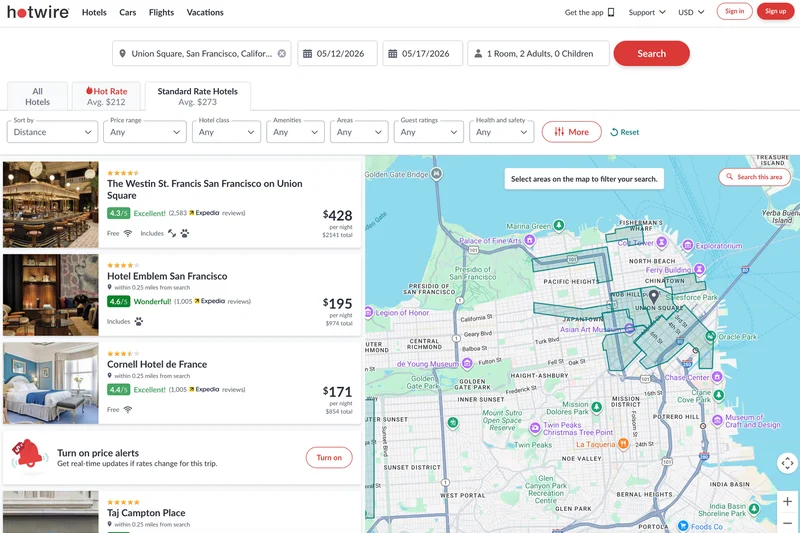
Hotwire (www.hotwire.com) would still be languishing out of the top ten (it was #14 last time) if some other big names hadn’t dropped out after merging with their corporate cousins. Hotwire was the only site that never “won” a single test. It never did better than average on price or number of lodgings, and it often did worse. Much, much worse.
Out of our 56 tests, Hotwire’s results were below average 44 times. That’s a 21% success rate. What’s more, in five of those instances, it couldn’t find any rate for the given hotel that other sites found. Other sites whiffed on that once or twice, but only Hotwire missed five times.
Hotwire is also frustrating to use. Its interface hasn’t changed for years. Hotwire remains the only hotel booking website without a detailed map option for all results. Its map only allows you to select one or more pre-determined zones on a city map—popular areas, yes, but by no means comprehensive. There’s plenty of real estate, even in the center of town, where Hotwire simply won’t let you click. Even if you know there are loads of hotels in there.
Hotwire was also terrible at organizing results. When we typed in the name of a specific hotel, instead of displaying that hotel followed by a bunch of other options—which is what every other site does—Hotwire simply returned the standard list of all results in that city. The search field would fill in the rest of the name and location of the hotel as we typed, so we knew Hotwire knew it existed. It just didn’t bother helping us find it.
We could go on about Hotwire’s many faults, but we would rather end with what’s positive: Hotwire is one of only four sites where the main results page actually shows you the true total cost—in smaller print under the lower lead price—even including resort/property fees and local city taxes. That, plus Hotwire’s patented blind-booking “Hot Rates” (mystery hotels that come with a discount if you’re willing not to know only the star level and location until after you pay), still have a bit of shine left.
Pros: Includes rates with taxes and fees. Blind-booking “Hot Rates” are priced well.
Cons: Performed below average 79% of the time. Limited map. Jumbled results. Sub-par filters.
#9: Expedia
OTA
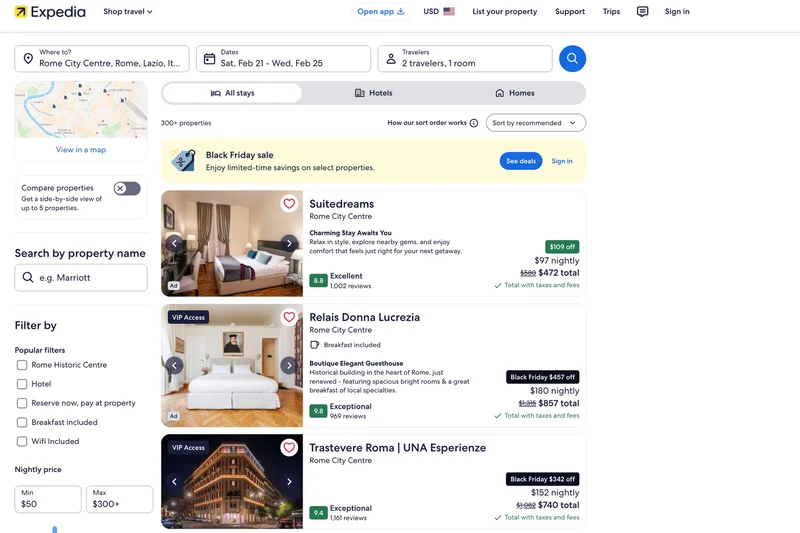
Expedia (www.expedia.com) falls on and off the Frommer’s Top Ten each time, but it’s never far from the bottom, which is probably not the ringing endorsement its marketing team was hoping for. Expedia does enjoy one huge advantage it shares with only four other sites (plus its copycat cousin Hotels.com): Its initial list of results truly shows the full price you’ll pay for each hotel, including taxes, resort/property fees, and city charges. They clearly know this is their selling point because they force you to close a pop-up window crowing about it every... single... time... you conduct a search.
If only those prices had been better than average more than three times in our tests. Its solitary best-in-showing was a $179 rate on San Francisco’s Marines Memorial Club & Hotel that most other sites had for $220. Then again, it also had the worst prices on two other San Fran lodgings. This uneven performance helps explain the #9 position.
Expedia’s filters were pretty meh. It wasn’t missing any important ones—and it had a few nice touches, like a price slider that includes a bar graph of rates, and it’s one of only two sites with a LGBTQ-friendly option.
But it also committed the cardinal sin of filtering: radio buttons. Unlike checkboxes, radio buttons only allow you to select a single option at a time, and Expedia employs them for its “Neighborhoods” filter. Not that it really mattered. Expedia listed far fewer “neighborhoods” than many competitors, and its filter proved useless anyway. Selecting “Center City" for Rome still showed places 10–16 miles out, including at Fiumicino airport. When asked to list hotels under $100 in Paris, Expedia could only find one—and it was actually 8.5 miles outside the city. Heck, even its #10 sibling, Hotwire, managed to come up with four cheap Parisian pads. (For reference, the site that tops our list this year gave us 242.)
Pros: Includes all taxes and fees in the initial results list. Filter for LGBTQ+.
Cons: Performed below average about 50% of the time. Mediocre and buggy filters.
#8: Booking.com
OTA
Booking.com (www.booking.com) has had the wildest ride of any site we’ve tested over the past decade. It reigned at the top of the heap for four years before falling to #4 or #2. This year, it cratered to #8.
We don’t get how Booking.com—like Expedia, the flagship site of a major industry conglomerate—performed worse than every other lodgings site under the Bookings Holdings umbrella. Three of its siblings ranked higher. It’s as if the more Booking spends on acquisitions and advertising, the more poorly it performs. Hate to say it, but “Booking-dot-nah.”
Booking.com still enjoys one of the deepest portfolios of properties, returning more than the average number of properties more than half the time, and the most results of any competing site for Hong Kong, Rome, and Philadelphia.
On the crucial price point, however, Booking.com has lost a few steps. Occasionally it scored the best rate on a cheap or luxury property, but it usually performed below average on mid-range hotels.
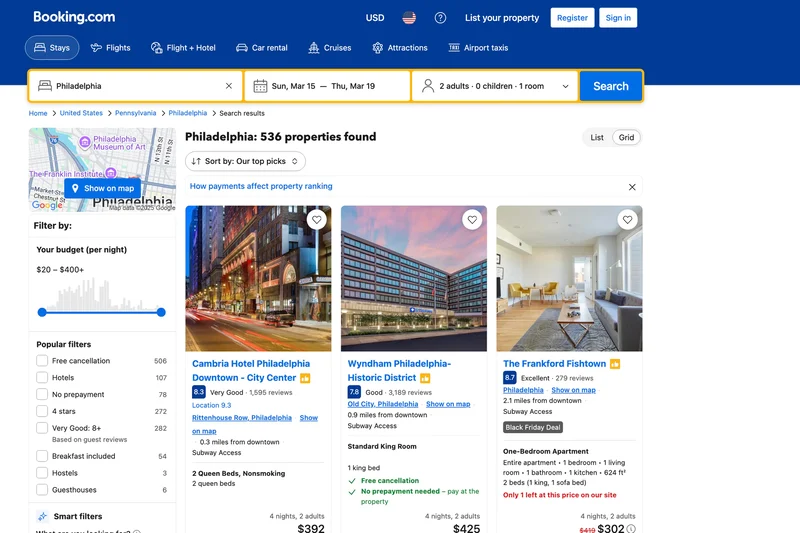
The one place where Booking.com still outpaces the competition (besides sheer hotel count) is in sorting and filtering options. Booking.com’s filters are better and more plentiful than the others on this list. It has all the important ones (lodging type, neighborhood/location, a price range slider, amenities, brands, etc.), with tons of options under each, plus a few rarer checkboxes, like filters for sustainability or an LGBTQ+ "Travel Proud" option.
Unlike any other sites’ foray into AI, when we asked Booking.com’s Smart Filter for Vegas hotels not on the Strip, it worked! When we asked it for Vegas hotels without casinos it... very nearly worked! That request did return a bunch of casino-less hotels, but a few casino hotels still slipped into the results. We decided to test its AI further by asking for Rome hotels with Pantheon views. It failed miserably.
Pros: Best filters of any OTA. Solid number of hotels found in most cities.
Cons: No longer a price leader. Taxes and fees not visible on results list (only on final booking page). Must sign in as a free member (or arrive via aggregator) to secure any real discounts.
#7: Trip.com
OTA
The results at Trip.com (www.trip.com) were all over the place. It smoked everybody—including our top three—at finding the best rates in Philly, nabbing the gold ring on four of nine hotels. Then, in San Francisco, Trip.com failed to find any price at all on two of the five specific properties we tested everyone on. Internationally, it did best with mid-range and costlier hotels.
Then again, Trip.com does offer a price match, promising to refund any difference if you find a lower rate elsewhere. If that policy holds, we suppose that technically, Trip.com can never be beaten on price, but you’d still have to do the legwork of finding a cheaper rate at a better-ranked site and the paperwork of proving it.
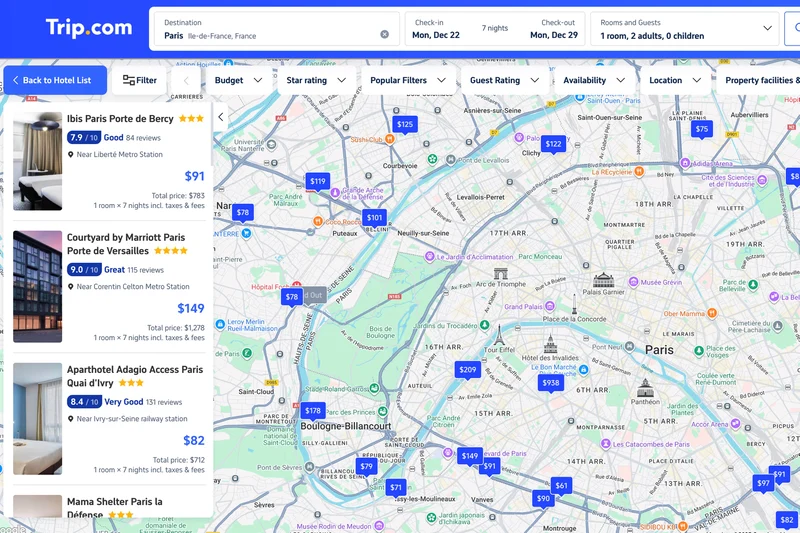
Trip.com did have one shining beacon of awesomeness, which it shared with its chums at the bottom of the list: The initial results showed the true, full price of a stay, including taxes and resort fees (in a smaller, light grey font). This honesty is key to comparison shopping.
However, Trip.com had the fewest filters of any site we tested, and even the ones it has weren’t as handy as they seemed. Even though it displayed the true prices including fees, Trip.com still sorted results by the misleading fee-free base rates. What’s more, the “sort by...” function could get screwy. At first, prices dutifully ascended as expected, but after 50 or 60 results, the rates started bouncing all over the place—still in the range requested, but not in order anymore.
Our biggest complaint about Trip.com’s filters is the dreaded radio button in the location sidebar. Nearly every other site gave us checkboxes. There were a ton of options divided into neighborhoods, attractions, transit stations—often more than any us site’s options—but you may only select one at a time.
What’s more (actually, less), if you sort by distance, you are at the mercy of whatever the site believes is the center of town. This should be easy: Trafalgar Square as the center of tourist London makes perfect sense. However, Trip.com often picks truly weird zero-mile spots, like Piazza della Repubblica in Rome (near plenty of cheap train station hotels, but definitely not the center of town) or the northern end of Hong Kong’s Mong Kok neighborhood (not in the city’s tourism heart by any measure).
Pros: Displays the full price for a stay, including taxes and fees. Price matches.
Cons: Filters severely lacking, both in number and functionality.
#6: Priceline
OTA
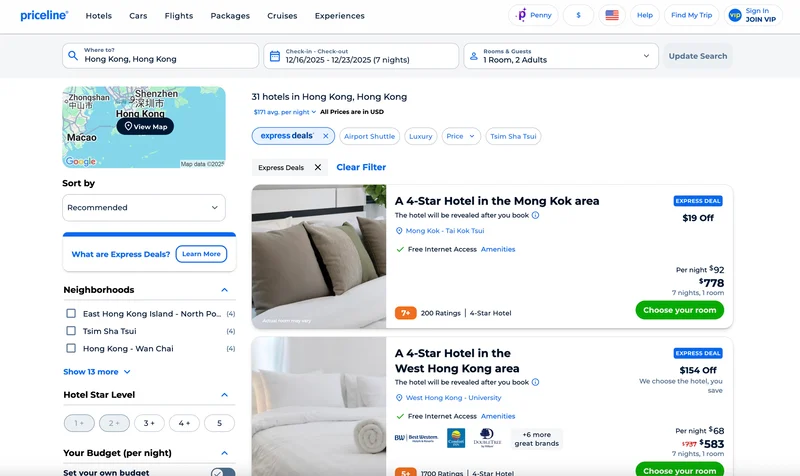
Priceline’s (www.priceline.com) results were merely average. It was aces at finding lots of hotels in Paris and Buenos Aires. Not so much in Philly or San Fran. It returned a great rate on a bougie hotel in Rome, but a crummy one on our budget option there. It snagged the best price for a mid-range hotel in Paris, but missed a mid-range Philadelphia spot entirely. And it totally fumbled on Buenos Aires rates. How can a traveler rely on those results?
Priceline does still have its famous blind-booking Express Deals that can save you anywhere from 3% to 60% (though 15%–40% is more typical) so long as you are willing to know only the neighborhood and star rating (but not the hotel’s name and address) before you pay. For discounts, Express Deals are a plus.
Also the plus side, Priceline had nearly as many filters as Booking.com, with extensive lists of lodging types, brands, themes, and amenities to help narrow choices (including locations near 10 major attractions in each destination). The set-your-price slider also included a dot pinpointing the average retail price for a hotel in that town on your date(s), which was a handy detail.
Priceline shows prices up front with taxes (in a considerably smaller font than the lower base rate), but it does not include resort charges or city fees. Those aren't revealed until the booking page. Why? A further quibble: Even though Priceline knows the full price with taxes, its filters always use the lower, base price. What’s the point of filtering based on a price that isn’t what you’ll actually pay?
Its attempt at AI was a flop. It couldn’t figure out how to show Vegas hotels without a casino in them, and when it was asked to find hotels off the Strip, it technically complied—by naming four properties 12 miles away in Henderson.
Priceline is also slower than the others. Priceline's searches were the two laggiest we tested, often spinning and not redrawing while other sites refreshed results faster.
Pros: Blind booking “Express Deals” offer savings of up to 60%. Excellent number of filters. Live agents for booking, if you want.
Cons: Average performance on price. Only includes taxes, not fees. Incompetent AI filter. Slow.
#5: HotelsCombined
Aggregator
HotelsCombined (www.hotelscombined.com) has slipped steadily down the rankings. It was #1 four years ago, #3 two years ago, and now it tumbles to here, in the middle of the pack, where results are resoundingly average.
On price, HotelsCombined performed better than our #2 and #3 sites in Rome and San Francisco, and it held its own in Buenos Aires. It also found up to twice as many hotels in Rome and San Francisco. In fact, if we weighted the number of hotel results as heavily as we did low prices, HotelsCombined would jump to #3.
Price searches were flubbed only three times, all at high-end hotels, and it snagged an excellent rate or the lowest rate five times.
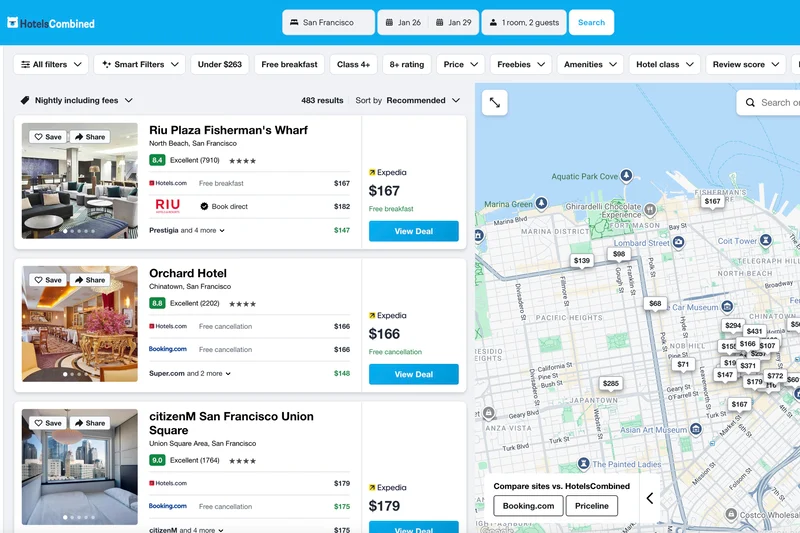
The extensive list of lodging alternatives contains a novel featurette: a little number noting the lowest price you’ll find in each category. We also liked its price tracker, filter for OTAs and booking sites (so you can weed out the websites you think are iffy), and the fact that you can start typing anything into the locations field and it will start listing landmarks to sort by distance.
HotelsCombined is one of the few sites on this list that will reveal rates with all taxes and fees—but frustratingly, it obscures this option. To see it, you must use the filter for “Price” where a drop-down menu allows you to choose to view the “Stay Total,” which folds in all taxes and fees. We don’t like jumping through hoops to see the true price.
To its credit, this aggregator frequently includes the price you’d pay by booking with the hotel directly, which is a classy move because telling you could cost it commissions. But that honesty is countered by this annoying facet: HotelsCombined’s results favor properties that make it the most money. The prominent price that’s featured in each result might not actually be the cheapest. The actual lowest price might be hidden in the additional rate options that appear in far smaller print, or it could remain unseen unless you click a dropdown menu.
Oh, and its AI-driven “Smart Filters” feature failed us completely.
Pros: More properties than most. Great filters. Can see full price with taxes and fees. Decent prices. Searches hotel sites directly.
Cons: Highly variable performance. Prioritizes revenue-generating results. Pointless AI filter.
#4: Agoda
OTA
Agoda (www.agoda.com) was our top performing OTA, but its performance was spotty. Not on the number of results. There, Agoda was nearly always in the smack dab middle of average.
However, when it came to prices, Agoda delivered wildly variable results. Perhaps in an echo of its origins as an Asia specialist, Agoda rocked in Hong Kong, finding the cheapest rates on three of the hotels, and second-best cost for the priciest (The Conrad). It also cleaned up in Buenos Aires, with two gold medal rates and two in second place—better than any other site, including the top three. It did fine in Philly, and even came up with a few better than average ones in Paris. But in San Francisco and Rome, its findings whiplashed between average, best, bad, worst—and it totally failed to find any price on three of our specific properties.
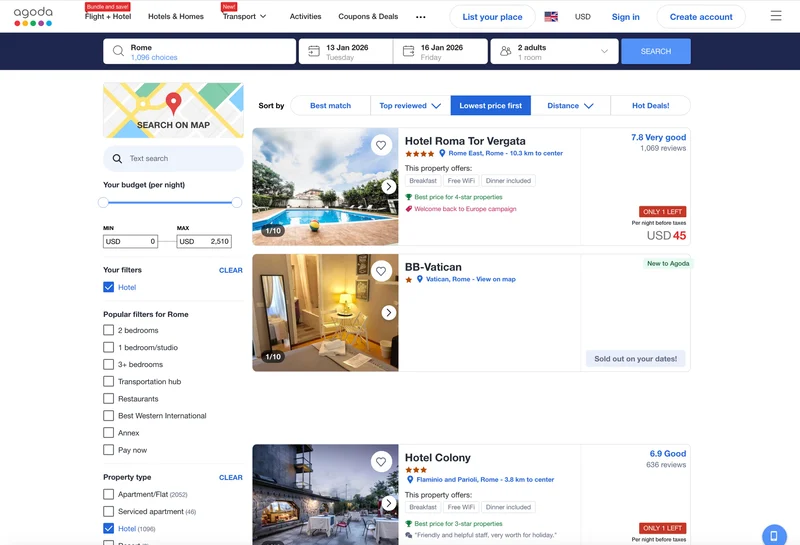
Agoda does have one unique feature. When picking dates, the pop-up calendar shows the average rate for a hotel in that destination each day for the next two months. Nice!
Agoda offers the fewest filters of any site outside of Trip.com, and they were hinky. For one thing, engaging a filter would affect the listed results but not the hotels plotted on the map. Also, when we asked Agoda for hotels under $55; it showed three at $91, $104, and $154. The site’s fine print freely admits that "commission earned affects the order of your results."
Agoda’s filter option for distance was comically terrible. In Philly, it failed to offer obvious landmarks like the Liberty Bell, City Hall, or even just “Center City.” Agoda’s options were the airport and main train station (fine), the North Philly Amtrak station (used by nearly no one), and three "top landmarks": Gorden Theater, Walt Whitman Cultural Center, and the NJ State Aquarium. (Note: None of those things are in Philadelphia. They are across the river in Camden, New Jersey. And it’s the Gordon, not Gorden.)
Agoda could also be coy about the best rate. For one Rome hotel, most top aggregators found their lowest price ($86) at Agoda, which we confirmed by clicking through. However, when we searched for the same hotel directly on Agoda, the rate dropped to $81. This sudden discount occurred a few times. The price differences were small, but it made us question reliability.
This is the kind of runaround that gives us a headache. But it reinforces the lesson. Always try your itinerary on several sites—and several types of sites— before committing.
Pros: Sometimes got excellent results, particularly in Asia. Average daily rates shown on the calendar. Sometimes offers discounts if you search Agoda directly.
Cons: Highly variable results. Relatively few filters, and unreliable ones at that.
#3: Skyscanner
Aggregator
Skyscanner (www.skyscanner.com) can boast an accomplishment no other site on our list can: Never once did Skyscanner return a result that was worse than average. Not on hotel count and not on price. It ranked #2 in finding the lowest rates. Not bad for a site nominally devoted to airfares.
Why didn’t it rank higher? It found better-than-average rates on only nine times out of 32 hotels tested, and it actually only ranked seventh when it came to number of hotels offered in each city. HotelsCombined, Priceline, Booking.com, Agoda, and our top two sites all outperformed it in the count of hotel options delivered.
So with Skyscanner, you will rarely find a bad price—and often you’ll find a good one—but on a smaller selection of properties.
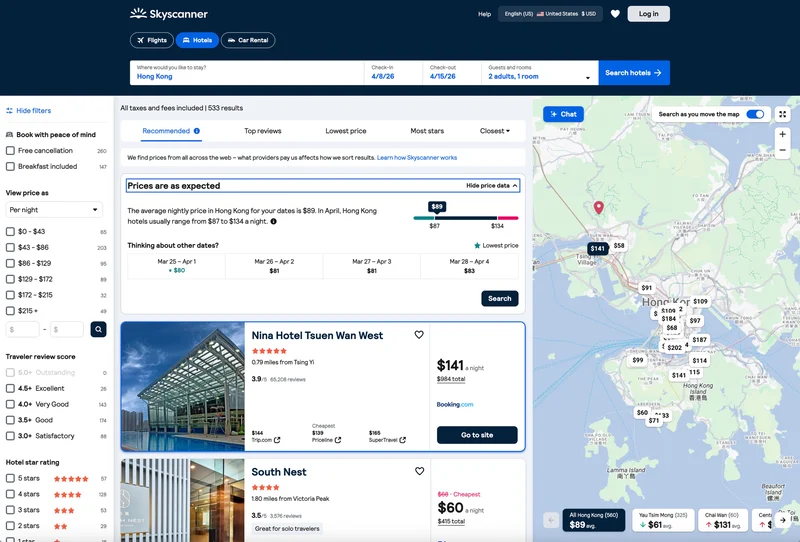
All the sites among our top four are weirdly sparse on filters, but of the four, Skyscanner did the job best. It has all the important filters—including lodging type and neighborhood, neither of which the top two sites offer. It doesn’t have a “nearby...” option, but it does let you sort by distance from downtown, major transit, and shopping.
There’s not much more to say because its results are solid, the site is well designed, and functionality didn’t present any weird issues. The only head-scratcher: Unlike every other site here, Skyscanner makes you click open separate calendars for your arrival and departure dates.
Pros: Sometimes finds great rates, and rarely any bad ones.
Cons: Fine, if mediocre, filters. Not quite as many results as most sites.
#2: Trivago
Aggregator
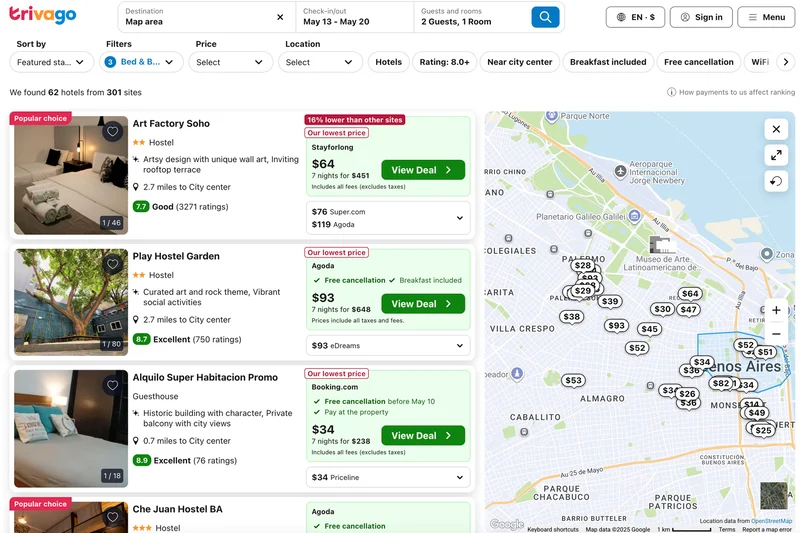
After languishing at the #7 or #8 spot for years, the Expedia Group’s in-house hotel aggregator Trivago (www.trivago.com) now succeeds at finding the most hotels across the most cities, from Philly to Frisco to Hong Kong, narrowly edging out even the #1 site on that score.
Trivago was also good at rooting up the best rates, particularly on mid-range properties. It landed the lowest price a respectable six times and only missed the mark twice (and not by much) on our cheapest Hong Kong option and our priciest Buenos Aires one.
Trivago offers the best location filter we tested, allowing customers to set the distance from a large number of neighborhoods, landmarks, transit hubs, or (and this is the kicker) any address you type in.
That win was the exception, though, among Trivago’s filters. Like the other top finishers, Trivago’s sorting options were sparse and limited. For “popular with,” we could pick “families” or “couples,” and that’s it. For “property type,” there’s just a choice of hotel, apartment, or “budget stays” (B&Bs, hostels, and guesthouses), with just a few subtypes under each. Oddly, Trivago was one of only two sites that lacked a filter for hotel brand names (the other one was last place finisher Hotwire).
We also noticed Trivago would slow to a stall after trying when handling multiple searches or filtering adjustments to our results. Sure, we were throwing a ton of tasks at it, but most of the others (except Priceline) didn’t have this issue.
Trivago, like some other booking sites, is testing an AI Smart Filter and, like most others, it is very much in beta. It failed to understand our request for Vegas hotels not on the Strip, and was only partly successful in finding ones without a casino.
Pros: Best site we tested at finding lots of lodgings. Great prices. Excellent and flexible location filter. Searches hotel sites directly. Sometimes offers a discounted booking service.
Cons: Can be slow. Limited filters. Deficient AI function.
#1: Google Travel
Aggregator
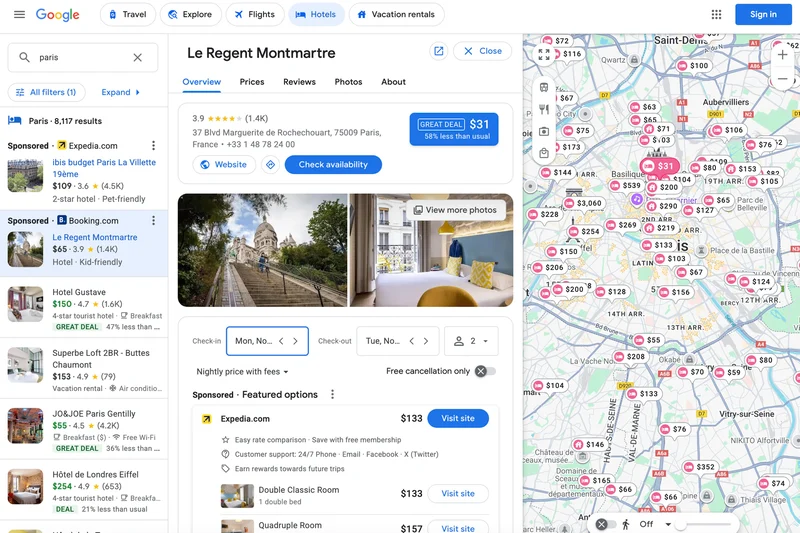
Google Travel (www.google.com/travel) is now in its second year leading our pack. Sure, it almost came in second to Trivago when it came to the sheer number of hotels that it found, but it was a very close second. Outside of the U.S., Google was usually in first place.
Having lots of options is one thing. Price is what truly matters, and when it comes to finding the best hotel rates, Google stands alone. Other top sites managed to scrounge up the best price on six or seven searches. Google Travel did it 12 times, plus it fared better than average with another four hotels. Google’s only pricing misstep was tanking on two of the four Buenos Aires properties, yet somehow simultaneously winning on the other two.
The cherry on top: All rates on Google Travel included taxes and fees—even if the price came from OTAs that don’t reveal those extra charges on their own initial results pages. It’s the only aggregator that does this by default.
Google Travel seemed to delight in including far more booking options than any of the competition, often including the hotel’s own website. The flip side is Google is agnostic when it comes to third-party OTAs. It’ll include all of the websites it can find, even the sketchy or unreliable ones we’d rather avoid. We’ll repeat it here one more time: Check the reputation of every unfamiliar booking agency.
Google Travel did have two big weaknesses. While it offered a price tracker (a feature matched only by HotelsCombined), Google’s filters and sorting options were woefully meager. Even for property type, the options were just “Hotels” and “Vacation Rentals.”
Google’s biggest failing by far was a lack of a filter or sort-by field for neighborhood or location—beyond, obviously, the little price bubbles in the map view we expect for every site. This oversight is truly mystifying.
Google also had a bewildering tendency to mix up prices, which sometimes changed when we navigated from the map to the listing. An example: The map price bubble for the Philadelphia Days Inn Convention Center showed $116. When clicked, it changed to $120, but upon inspection, the lowest price was actually $109 via Booking.com. Showing that lowest price across the board in the first instance would be a great help when comparison shopping.
TL/DR: Google Travel had the best prices on the most options, with no hidden fees.
Pros: Best prices, on average, of any site. Includes taxes and fees. Searches the most sites. Searches hotel sites directly. Huge number of results. Sometimes includes tips on when to visit and where to stay.
Cons: Curiously limited filters. No option to organize by location. Price quotes shift slightly.