

It’s been a decade since Frommer’s started pitting the biggest airfare search engines, aggregators, and booking engines against one another. In 10 years, the only constants have been that brand-name marketing can only get you so far, clever new strategies only work for so long, and the top spot is always up for grabs.
Our 10th anniversary tests resulted in some pretty big shake-ups in the top 10. Tripadvisor, which had held the #5 spot for years, cut its booking features. Two booking sites and an app from past roundups failed to make the cut this year—but four sites that had slipped out of the top 10 in recent years came roaring back.
The biggest change of all: Most sites now canvass Southwest Airlines. You used to have to search fares for that low-cost carrier on your own, but now Southwest flights pop up in the results at 8 of our top 10 sites (as of this writing).
Before we get to our 2026 ranking of the best sites for finding affordable airfare, allow us to explain how we ran our tests and to address the biggest elephant in any room nowadays: AI.

Methodology: How we tested the best airfare search sites
We put 18 sites through the paces on 32 itineraries, testing each on both last-minute flights (leaving in a week) and APEX fares (Advance Purchase Excursions booked 3 months out). We covered major gateways (NYC to LA, LA to Hong Kong, NYC to Paris) and secondary ones (Philly to Tampa, Chicago to Rome, Miami to Rio).
Finally, we threw in a curve ball (Denver to Delhi) and included a flight with no North American legs (London to Barcelona) to see how well each handled Europe‘s wilderness of low-cost carriers.
Requiring realistic results, we ignored low fares that would be miserable to fly due to excessively drawn-out layovers, too many stops, or long detours just to change planes. Basically, we rejected any itinerary that increased total travel time by more than half. Aggregators may think those are viable plans, but we don’t.
We applied a rigorous, weighted scoring system that rewarded three points to any airfare search site that found the best fares, two points for second-best, and so on. We deducted points if the price proved to be higher than the average result from all the other competitors. Fares within 1% of one another were considered equal.

OTAs vs. aggregators
Some airfare websites are online travel agencies (OTAs), which sell tickets directly. Think: Expedia, Hotwire, Priceline, and so on.
Other sites are aggregators that do searches instead of sales, trawling dozens of OTAs, booking engines, and airline sites to compile the results in one place. Travelers then click through to their selection to make the actual purchase on the third-party site. Keep in mind that an aggregator is only as good as the OTAs it canvasses.
Many OTAs are perfectly fine; some of the best made this list. Some OTAs are prone to dangling lead prices a few bucks below what they will actually offer once you click through. The worst become masters of the bait-and-switch, and you might not find that out until you’ve entered your credit card info.
Then there are OTAs that are legit but have terrible reputations for customer service—fine if all goes well, but good luck if a flight gets canceled or you need to make a change. Always do a quick Better Business Bureau check for an unfamiliar airfare seller and search for complaints and red flags. (We ignored any fares from sites known to be disreputable.)
Remember, too, that prices can change from moment to moment and even the most honorable aggregator may lead you to a site where you can’t find the airfare you were originally quoted.
All quality aggregators will remove unreliable ticket sellers from search results, but new companies pop up all the time and some can slip through. Lately we’ve seen the emergence of some truly janky OTAs “powered” by AI, most with almost comically bad results and nonexistent customer service.
Which brings us to the latest wrinkle in the airfares game: artificial intelligence.

What about AI?
This year we nervously tested our results against AI, asking six major chatbots to find the cheapest fare on our first itinerary. Posing more than one query at a time caused the bots to hallucinate random cities we never mentioned, so we stuck with NYC to LA only.
Nearly all AI results went straight to Expedia and/or Google Flights. ChatGPT threw in Kayak as well. DeepSeek got cagey, spouting evasions about “illustrative examples based on historical pricing data and current market trends.” No AI services would commit to providing an answer for our precise dates, and most of the sample answers were wildly inaccurate.
Claude and Grok both picked Frontier Airlines, quoting fares between $121 and $196. Actual Frontier fare: $262. Perplexity and DeepSeek both liked Spirit Airlines, but disagreed on price: $126 and $278, respectively. Actual Spirit fare: $232. ChaptGPT claimed we’d pay $126, but never deigned to mention the airline.
What’s more, none of those AI results was the actual lowest price we found using our human brains and human typing fingers. Only Gemini managed to hit upon that ($226 on American Airlines), likely due to the benefits of sharing a corporate bed with Google Flights.
No AI chatbot bothered to check our overall top three aggregators, which for most searches (if not this one) handily beat Google Flights.
For now at least, our imminent robot overlords make for terrible travel agents.
Okay, now the rankings.
The 10 best sites for finding affordable airfare in 2026
#10: Agoda
OTA
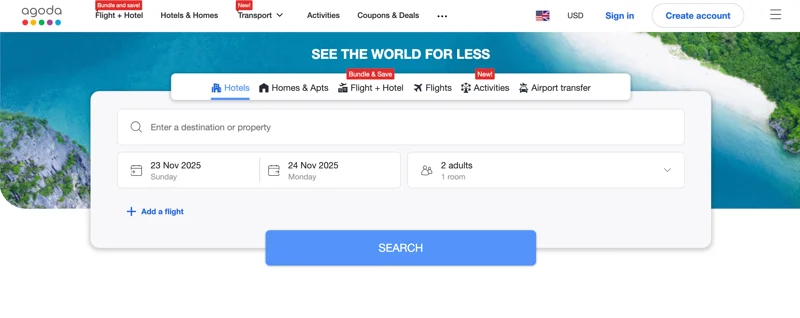
Agoda has clawed its way back onto the list for the first time in 5 years—but just barely. It has the most limited of filters to help sort through results, and, for some reason, during testing Agoda defaulted to one-way trips, whereas every other site assumed you’d want to come home at some point.
More crucially, Agoda whiffed on half our test itineraries, scoring below average 17 times and winning the dubious honor of returning the highest price five times—more than any other site on this ranking. Additionally, Agoda tacked on taxes and agent fees that sometimes added 12% or more to what the airline itself was charging.
On advance-purchase fares the site actually performed better than average on seven tests out of 16, and was especially good at puzzling together different airlines and less obvious airports on intercontinental trips to craft cheap fares.
What really sank Agoda were last-minute tickets, where it performed below average 12 out of 16 times, with four of those being the worst of any of its competitors.
Another notable failure: Like most sites now, the first results screen only displays outbound flights; you have to select one of those before seeing return options. That’s pretty normal, albeit annoying. What is not normal is that if you filter those outbound options for only direct flights, Agoda will sometimes display a low round-trip price that turns out only to be valid if paired with a non-direct flight for the return. We’ll generously chalk that one up to poor filtering and not a bait-and-switch tactic.
In short, don't bother with Agoda for last-minute trips, but for travel a few months down the line? Maybe give it a quick look.
Pros: Can sometimes find good rates on trips several months out. Decent at finding innovative itineraries on international trips to save a few bucks.
Cons: Not great at scoring the best price, especially on short notice. Adds fees. Limited filters. Prices can sometimes rise on subsequent screens. Doesn’t assume round-trip.
#9: Priceline
OTA
Priceline has slipped three spots this year, largely due to a poor showing where it counts most: offering cheap airfares.
Like Agoda, Priceline fared better on advance bookings than last-minute flights—though kudos on matching our top pick’s cheapest last-minute direct fare from LA to Hong Kong. Elsewhere, though, Priceline only turned up such gems three times in 32 tests.
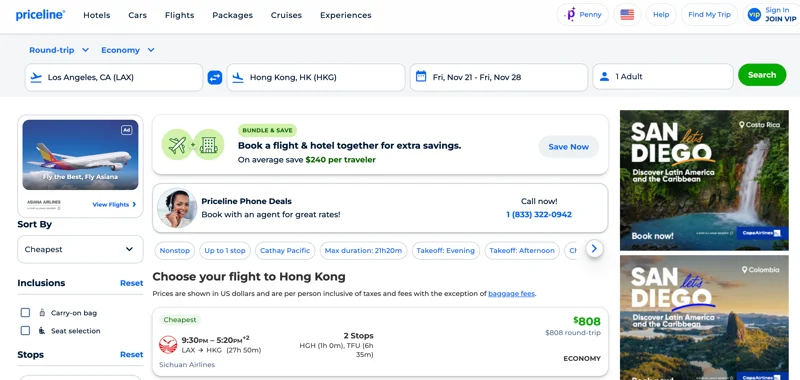
The site suffered, like most others at this end of the list, from a limited set of basic filters (though Priceline does have one for airports, which can come in handy for large metro areas). It also had the annoying habit of opening a new tab every time we clicked a choice.
Even if its price performance were better, we’d ding Priceline for its bait-and-switch habit. Like most sites, it shows only outbound flights on the first results page, with the price for the full round-trip in the fine print of each option. That price sometimes magically went up once we got to the next screen to pick the return leg—anywhere from $13 to $177 in our tests. Not cool.
Pros: Not bad for trips further out.
Cons: Meh price results. Basic filters. Comparison-shopping hampered by prices changing screen to screen.
#8: Booking.com
OTA
Though its core business is lodgings, Booking.com does have a flight booking function, and it’s not bad. Like most other OTAs, it was better at fares for faraway trips than last-minute ones, where Booking was particularly weak on intercontinental itineraries.
Overall, Booking’s results were so average it had the embarrassing distinction of being the only top 10 site never to find the best fare for any flight, and it scored only two second-best results (APEX Chicago to Rome and, for some reason, Denver to Delhi).
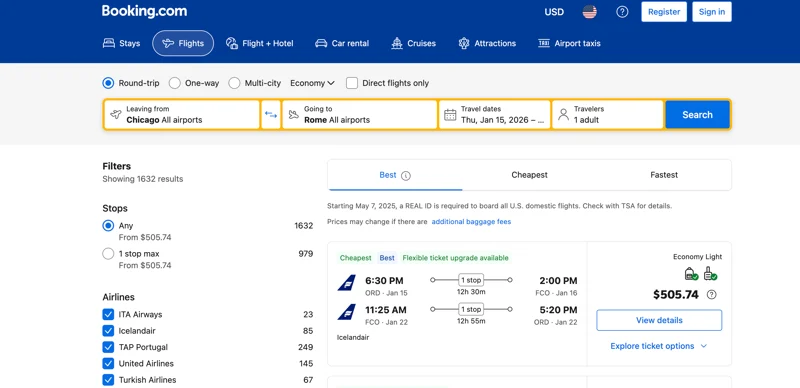
How about the interface? As with most OTAs, Booking’s filters are pretty basic. It was, however, one of only three sites with a slider filter for layover duration, allowing you to weed out routes where you spend half a day at O’Hare.
But on the initial result page of outbound flights the site did not actually display the airport or duration of said layovers on any non-direct options. Booking merely noted if a route included a stop or two. We couldn’t get that important intel until we got to the return flights page and selected the "View Details" pop-up. This site also failed to sort results by departure or arrival time, while most others did.
Even stranger, Booking didn’t mention bag fees at all on the results page for outbound flights, but for return flights an indication appears of which types of bags are free (personal item, carry-on). We still had to consult the pop-up window to get links to the airline websites for info about checked luggage fees.
One bright spot: The results page now includes a nice little AI Search Summary that was actually kinda helpful. On one search the widget explained that none of the itineraries with one or more stops was much cheaper than the direct flight, making that the best all-around choice.
Pros: Not bad at APEX fares. Only site using AI in a helpful way.
Cons: Rigorously average results. Basic filters. Odd lack of detail on outbound results.

#7: Expedia
OTA
One of the OG travel booking sites ranking back in the top 10 for the first time since 2020 deserves some fanfare. Five years ago, Expedia was barely hanging on at #10, so this year’s seventh place finish represents a marked improvement.
The only itinerary where it tanked, returning the worst results of any competitor, was New York to Paris, and that’s because Expedia stuck with United’s fares when every other site knew that low-cost carrier French Bee was cheaper.
Expedia did turn up the best fare in three searches—and good ones in another three—but had difficulty finding the best last-minute airfares, a common failing here in the bottom half of the list. That said, Expedia did turn up the cheapest last-minute direct fare from Miami to Rio.
We found it a bit sneaky that sometimes a low lead price on a direct flight ended up—after we selected the outbound leg and could see the return flight options—only to be valid if we chose a non-direct return.
On the plus side, Expedia was one of the few OTAs to provide a price matrix for different dates, showing fares for 3 days on either side of your chosen date so you can see if you’d save by leaving a little earlier or later.
Results showed prices for both the basic fare and one class up from that, with little icons indicating whether seat choice, carry-on, or checked bags are free or not. After choosing a departure, a pop-up offered even more fare class options, plus more details on each. It was a subtle bit of upselling that had the benefit of providing more options as well.
Pros: Shows more detail for each option than some other OTAs. Shows prices on alternate dates 3 days to either side.
Cons: Lead price on a direct fare sometimes required a non-direct return. Sometimes seemed to favor legacy carriers over newer, cheaper rivals.
#6: Hotwire
OTA
Hotwire has climbed a few notches since last time. Credit largely goes to its vast improvement on last-minute airfares. In fact, Hotwire and the site in fifth place were the only OTAs that found more better-than-average prices than worse-than-average prices on tickets for travel just a week out.
Hotwire’s shining moment in our tests came when it was the only site to find the lowest APEX fare for both a direct flight and an even cheaper, non-direct routing from NYC to LA. The secret? Hotwire knew to look beyond LAX, flying into Burbank and back from Ontario.
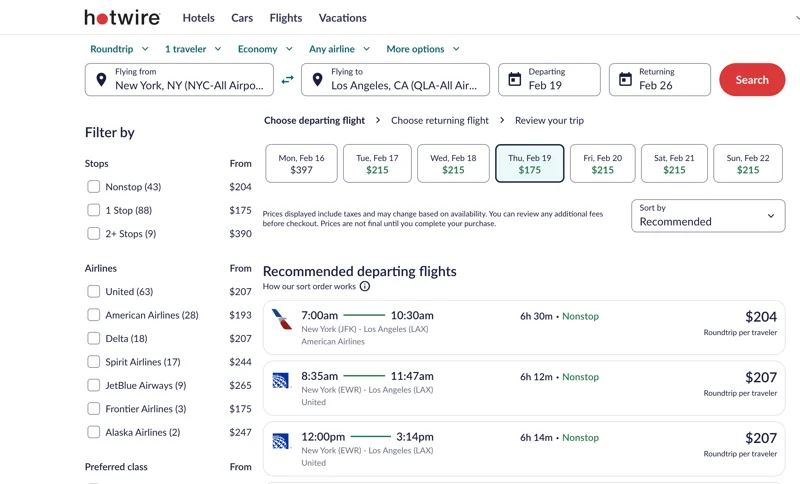
The site has the usual basic filtering options, along with plenty of info in the results to help make a decision, save one. Alone among all the sites here, Hotwire inexplicably lacks a filter for flight duration.
On the other hand, Hotwire boasts one incredibly useful feature matched only by our #1 pick: actual baggage fees. Once you choose a flight time, the pop-up shows you several fare levels that include what you’ll shell out for your luggage (plus cancellation or change fees) at each level. Not just links to the airline so you can look up those fees. The actual cost. In dollars. No other sites do that. Good on ya, Hotwire.
We should note one bug that came up: At one point, Hotwire, perhaps suspicious of all our random searches, decided to check if we were human and put us into an endless captcha cycle that we only escaped by switching to a different browser.
Pros: One of only two sites to show actual baggage fees. Better performance on last-minute fares than most OTAs. Decent filters.
Cons: Average prices overall. No flight duration filter.

#5: Flight Network
OTA
This Canadian-born OTA outperformed all the better-known brands to break into the top five. Flight Network found the lowest fares a respectable six times, a feat matched only by two of our top three contenders. Unlike most OTAs, Flight Network performed equally well at last-minute and advance bookings, turning up a better-than-average rate about a third of the time.
What’s more, this is the only OTA besides Expedia that gives flexible travelers a sense of fares on other dates, with pop-up calendars color-coded to indicate which days were $, $$, or $$$ for a given route. (A quibble: Unlike at every other site, Flight Network didn’t let us select a travel date range on a single calendar, requiring instead separate pop-ups for departure and return flights.)
Flight Network’s filters are only OK, lacking a few relating to airports and layovers offered by some competitors but adding a price filter and, uniquely, another that eliminates flights requiring a self-transfer.
The site does take a few extra clicks to get to some information that other sites make more obvious. Not until we clicked "View Trip" on a choice and then "Show Trip Details" could we learn the operating airline on codeshare flights or whether the base price included a free bag.
Pros: Solid, if average, performance on price. Fare variations indicated on calendars. Price filter.
Cons: Mediocre filters. Some useful info not displayed until later in the booking process.
#4: Google Flights
Aggregator
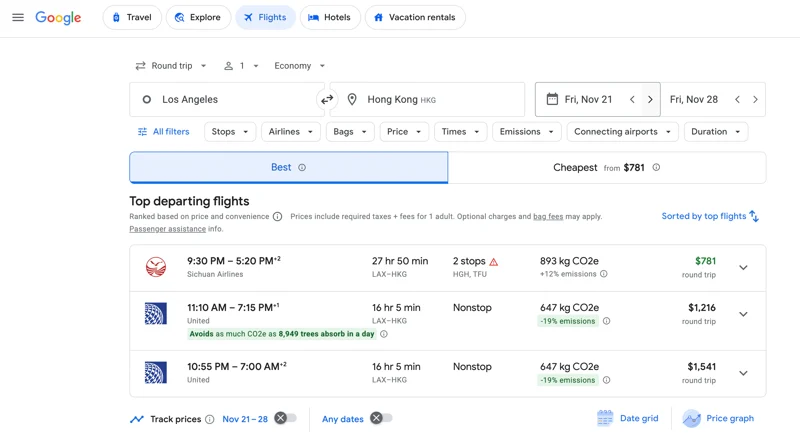
We will never understand how Google, the titan of search, took 7 years to refine its dedicated flight search engine enough to make it back into our top five. Last time we ran these tests Google barely held on at #10.
Its algorithms seemingly now in order, Google has rocketed up six places since 2024. This year, it only flubbed a single fare, on the last-minute LA to Hong Kong trip. Google balanced this with performing better than average eight times. In fact, when it came to APEX fares Google Flights edged out our #3 finisher.
One feature where Google Flights has always ruled the roost is speed. Results refresh almost the second you finish typing in a city, changing a date, or ticking a filter box. It’s kind of spooky.
Google Flights has also gotten better at putting fares in context. A price tracker/fare alert system displays the average going prices for your chosen route on the pop-up calendar. A “fare history” line graph shows whether today’s price is lower or higher than usual. And a fare grid compares travel costs 3 days to either side of the chosen dates.
Flight amenities appear in a drop-down with each option, and you can even see if a particular flight often experiences delays and by how much. A fun feature: Pick “Anywhere” as your destination and you get a map of the world with dozens of possibilities and prices. (Our #1 pick does this, too.)
Google Flights does need some work on its filters, which are fine but don’t include some handy ones like “Airport” and “Layover Duration.”
Pros: Fastest in the business. Particularly good on APEX fares. Price tracker/fare alert. Calendars include typical fares. Results include amenities and typical delays.
Cons: Could increase the number of sorting and filter options.
#3: Skiplagged
Aggregator
Skiplagged actually outperformed our #2 pick on last-minute fares. However, it stumbled a few times on advance-purchase tickets, coming in fourth. Hence the overall third-place finish.
What’s particularly impressive is that Skiplagged snagged the bronze even though we completely ignored any results that required, well, skiplagging. That controversial technique, which relies on what are known as "hidden city" fares, boils down to this: You book a cheaper airfare that stops in the city you want to visit, though it’s not the itinerary’s final destination. Then you hop off the plane when you get where you want to go, without continuing on to that final destination. (Obviously, you can’t check any luggage).
The trick sounds simple—and can indeed cost less sometimes—but it’s too risky to recommend. Skiplagging breaks airlines' rules and can result in pricey consequences if you’re caught, including canceled return tickets and even lawsuits.
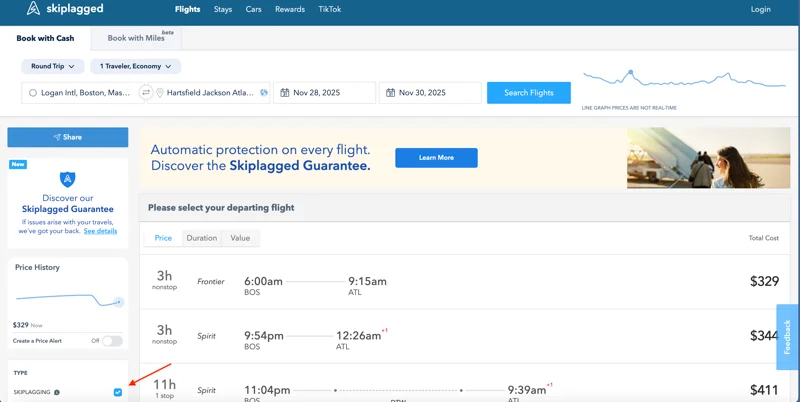
Disregarding hidden fares, though, Skiplagged still performed well when we limited the results to traditional, law-abiding fares (to do so, just untick the checkbox in the filters sidebar).
Skiplagged snagged the best price an impressive five times; it even found a cheaper NYC to LA fare than any other site. It stumbled only on the LA to Hong Kong APEX fare (Skiplagged did better than average in the last-minute department).
One of our favorite things about Skiplagged is the way it displays results on nifty timelines that show, at scale, the duration of all flights and layovers. That’s great for comparing options.
Skiplagged has a robust set of filters and offers a fare alert service—though “offer” might not be a strong enough word when you have to close a pop-up for that feature before you can see the results.
Speaking of annoyances, Skiplagged lacks a filter for price range, which seems like a no-brainer. Sorting options are limited to price, duration, and value; many other sites can also sort by departure or arrival time. Sure, Skiplagged has a filter to narrow those down, but no sort-by option.
Most sites offer flexible travelers a way to search on all the airports in a large metro region, and while Skiplagged could do that for New York, it did not for Los Angeles. Specifying only LAX means potentially missing out on cheaper fares in or out of Burbank, Long Beach, and other relatively close airports.
Frustratingly, Skiplagged often expected us to do separate transactions for the departure and return, going through the entire process to book and pay for the outbound leg, then going back to the original results and starting over. This felt like needless time spent filling out the same details, and prompted worries over whether the promised return flight would still be available in 5 minutes.
Most aggregators get their income from the providers, but Skiplagged milks a bit from users via a "Skiplagged Benefits” fee of 2.3%. Though the charge isn’t hidden, it’s worth mentioning.
Skiplagged could be a little buggy during tests, too. After one search, we tried to enter new dates and Skiplagged said no flights could be found. We had to go back to the homepage and start over to get results. A user who didn’t already knew there were flights on those dates might have assumed there was nothing available.
More worryingly, Skiplagged pulled a few sneaky-feeling moves. When it showed an unusually low price for DFW-DEL, we clicked all the way through the booking process to be sure—and ended up reading, "Sorry for the inconvenience, but the airline has increased the price of this ticket by $199."
That made it sound like the increase had just happened, but when we tried booking the flight on different browsers—cleansed of all cookies and using different VPNs—Skiplagged always baited us with that unavailable low price first. We don’t know if Skiplagged is slow to update databases or something, but the whole thing felt fishy.
Pros: Excellent fares. Clean but visually informative interface. Great filters. Price tracker/fare alert.
Cons: Fares sometimes higher than reported in the first round of results. Adds fees. Offers a little less flexibility than others. Sometimes requires multiple transactions for a single itinerary. Occasionally buggy.
#2: Skyscanner
Aggregator
Skyscanner has held the #2 spot for a while now. Last-minute fares need some work (Skiplagged outperforms it in that regard), but no site other than our #1 was able to beat Skyscanner on advance fares, where it returned better-than-average options three quarters of the time. In fact, this aggregator only failed a single test, and that was for a last-minute fare on our most complex itinerary.
Skyscanner offers more sorting options than rival Skiplagged, including “Best,” “Cheapest,” “Fastest,” and departure time for outbound or return flights (but not, oddly, arrival times, which about half the sites here do cover).
Skyscanner does well on fare comparisons. The date-pick calendar color-codes each day as typically $, $$, or $$$ for your itinerary. The results page shows typical fares 3 days to either side of departure, and there’s a full matrix of departures and returns in the “Flexible Dates” pop-up. You can sign up for price tracker/fare alert emails as well.
The results page is designed to display a ton of details on each flight, including plane type, seating arrangement/pitch room, and amenities. There are nice little touches like highlighting if a return flight uses a different airport at either end.
One hugely helpful Skyscanner feature no other aggregator currently employs: a star rating on each third-party booking site based on user reviews. That’s tremendously helpful for travelers trying to vet unfamiliar OTAs.
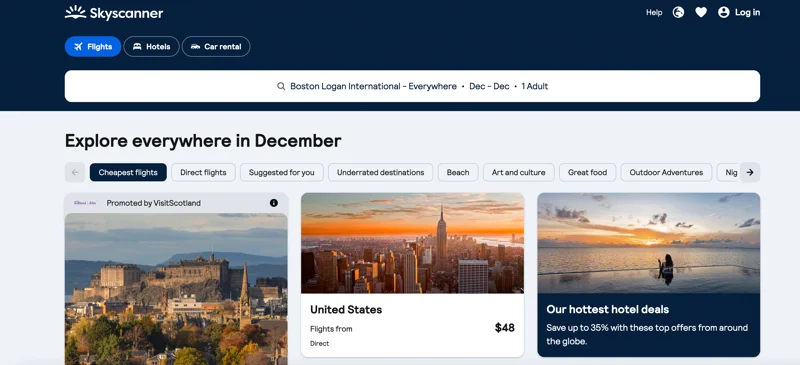
You can choose "Explore everywhere" as your destination to see a grid of the cheapest flights to destinations around the world with pretty pictures. (A similar feature at Skiplagged is constrained to North America, another reason Skyscanner gets the edge.)
We do have to issue a demerit for how Skyscanner handles layovers. It’s missing filters for layover airports or duration, and on the first page of results for outgoing flights only the airport code is displayed. You don’t learn the layover duration until you get to the booking page.
Pros: Excellent results, particularly on APEX fares. Decent filters. Lots of detail on flights. Fare calendars. Price tracker/fare alert. Ratings of third-party booking sites.
Cons: Could be better at providing layover intel. Last-minute fares not as good as advance ones.
#1: Momondo
Aggregator
Longtime Frommer’s readers won’t be surprised to see this name in first place. Momondo has reigned at or near the top of the list almost every time we’ve run our tests. Even if its filters and features weren’t the best in the business—and they are—Momondo would win on price alone. (If the hyperlink above redirects to Kayak, which is owned by the same company, simply enter momondo.com directly in your web browser.)
Momondo is the only site that never found a bum fare during testing. Not once. It did the best on last-minute trips. It won on advance-purchase fares. Overall, it performed better than average a total of 18 times, finding the cheapest fare available on half of those. For comparison, Skiplagged only did that four times, Skyscanner three times.
Momondo’s best exclusive feature: It includes checked baggage fees. Most airlines charge $35–$40, but the range can start as low as $15 on some Hawaiian Airlines flights and go up to $100 on some Frontier ones—so if you’re comparing prices, base fares don’t tell the full story.
A few other sites now have filters for flights that include a carry-on and/or checked bag, and many sites note that fees may exist and provide links to the airlines for more info. But only Momondo will fold baggage fees into prices on the initial results screen. A "Fee Assistant" lets you input the number of checked and carry-on bags you intend to bring and then recalculates (and re-sorts) the results immediately. Wow.
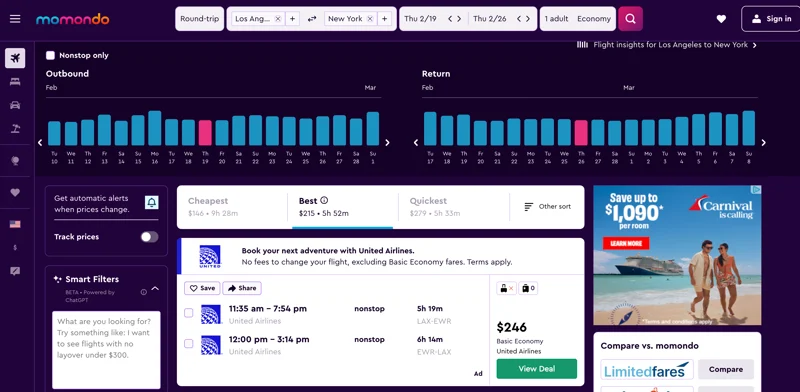
While we’re on the subject, Momondo’s results screen is one of the most complete we’ve ever seen. It offers a ton of intel at a glance, including bar graphs showing the relative cost of flying 10 days to either side of your chosen dates.
You can sort the results by just about any major factor—the cheapest, fastest, and best routes, or by departure or arrival time. Also, for some unfathomable reason, you can see the slowest or most expensive routes.
Momondo features the most filters in the business, allowing you to get incredibly granular. Along with all the usual ones, you can filter by airports, layovers, and price.
Several filters are unique to Momondo, including options for aircraft type and “Flight Quality” (accounting for Wi-Fi, red-eyes, longer flights, etc.).
Like Skyscanner, Momondo produces initial pop-up booking calendars that color-code each day to indicate the cheapest, median, and priciest days to fly in those months. There’s the usual price tracker/fare alert system, but Momondo also offers "Fare insights," a pop-up of graphs and charts showing price trends over time for any given city pair, bracketing the overall ticket costs, and advising how far out to book to snag the best deals. It's like having an expert travel agent right there.
Additionally, Momondo has cracked the eternal problem of how to display flight results. Instead of showing only outbound flights on the first page of results and making you pick one to get a second page of potential return flights, Momondo presents a laundry list of matched outbound/return options and gives each flight a little checkbox. Select that flight and the results instantly winnow down to those with that departure and potential returns. Brilliant.
Momondo did encounter a few hiccups in tests. Unlike many sites, Momondo would not let us enter “Los Angeles area” in the initial search, just LAX, and even though the results page filter did have other LA metro airports we could toggle on, Momondo still somehow missed the $193 round-trip on Southwest from LaGuardia to Burbank that Google, Hotwire, Expedia, and Priceline all spotted. Sure, this was a savings of only $34—definitely not worth the plane change in Denver each way—but it does reveal a chink in Momondo's search armor.
One final ding: We found Momondo’s new AI "SmartFilter" in no way reliable. When we could get the feature to work at all, it bungled even simple commands that mirrored existing filters. When asked to remove an airline from results, the SmartFilter did so, but only for outbound flights. When asked to show only direct flights under a certain price, it erased all results and claimed there weren’t any (there were plenty). Half the time when we typed something in and hit return, nothing happened. In short, this feature needs work.
Otherwise, keep doing what you’re doing, Momondo.
(For the record, you get the same results from Momondo and corporate cousin Kayak, but Momondo pioneered the innovative features and has an easier-on-the-eyes design, so it’s the one we highlight.)
Pros: Best results. Best filters. Best sorting options. Only site to calculate bag fees. Price graphs for flexible itineraries. Results screen well designed to show most intel without additional clicks. “Flight insights” feature contextualizing all the factors of a flight. Price tracker/fare alert.
Cons: Not as fast as Google Flights. Enabling secondary airports required an additional filtering step for LA and Miami.