

The Transportation Security Administration (TSA) and Google recently announced a new partnership with Google Wallet that aims to make navigating through U.S. airport security lines even faster for eligible travelers.
“Our collaboration with Google helps our trusted TSA PreCheck travelers enjoy the fastest route through airport security,” says TSA modernization acting chief innovation officer Shelu Patel in a statement. “Delivering seamless experiences like this is one more way TSA is working to deliver the Golden Age of Travel.”
This is the first time Touchless ID enrollment will be available via a digital wallet.
Previously, the service was only available through six major participating airlines and required entering a Known Traveler Number (KTN) and passport information through each airline’s rewards membership portal, for which users also need registered accounts.
Now, Google Wallet users can use Touchless ID while flying over 100 different airlines while only having to upload their information once.
Available at no cost for TSA PreCheck registered travelers, Touchless ID allows enrollees to use faster dedicated PreCheck lines at airport security checkpoints to verify their identity without handing over a physical ID.
Instead of fishing a passport or driver’s license out of pockets or a purse while also trying to consolidate luggage and personal items prior to entering the screening area, Touchless ID users walk through separate (typically shorter) lines, look into a camera, wait a few seconds for the system to digitally match their face against their uploaded documents, then proceed to screening.
That might not seem like that big of a deal for seasoned travelers (how long does it really take to hand over an ID for scanning?), but compounded across dozens of people ahead of you in queue—plenty of whom seem to enjoy taking their sweet, disheveled time—the time-savings are real.
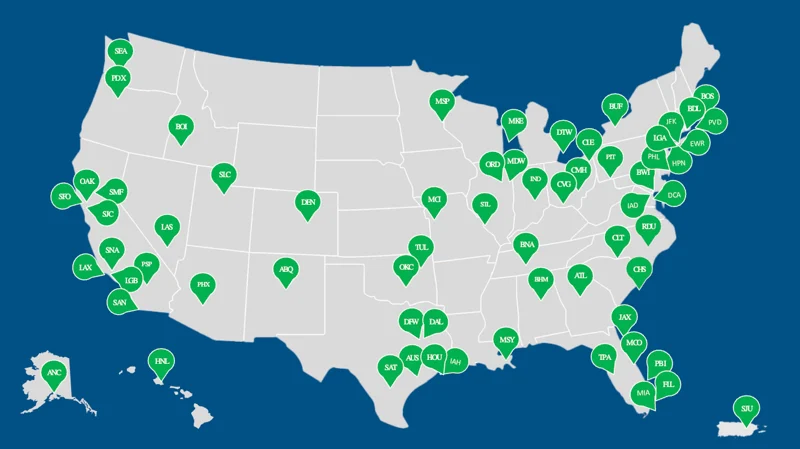
Currently, TSA PreCheck Touchless ID is available at 65 U.S. airports.
How it works
In the Google Wallet app, Add a Digital ID by pressing the + icon next to the View more button at the bottom of the screen. Select IDs & personal info, then select ID pass to scan your passport and face.
Note: a valid passport is required for Touchless ID whether you use enroll with Google Wallet or not.
Check in to your flight and save your digital boarding pass to Google Wallet. This doesn’t work with printed paper passes.
Agree to securely share your Google ID pass and the boarding pass with TSA.
You’ll know it worked when you see when you see the Touchless ID icon (pictured below) at the top of your boarding pass.
Don't forget to bring a REAL-ID compliant physical form of an acceptable ID as a backup.
Note: There have been no announcements as of yet as to whether this perk will soon be extended to Apple Wallets, and other platforms.